

Game Boy Tower


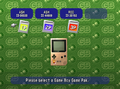
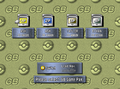
Game Boy Tower (Japanese: GBビル GB Building), or GB Tower in Pokémon Stadium 2, is a location in the Pokémon Stadium series where players may play the core series Game Boy and Game Boy Color Pokémon games in color using the Transfer Pak. Pokémon Stadium's Game Boy Tower is compatible with Pokémon Red, Blue, Green, and Yellow, while Pokémon Stadium 2 expands compatibility to Pokémon Gold, Silver, and Crystal. Aside from being limited to these games, the Game Boy Tower functions similarly to the Super Game Boy accessory.
Unlike the Super Game Boy, which can only display Pokémon Gold and Silver using limited color palettes, the Game Boy Tower displays colors similarly to how they would appear on a Game Boy Color; the Game Boy Tower also has the ability to run Pokémon Crystal whereas the Super Game Boy does not. When playing through the Game Boy Tower, the game screen is framed by decorative borders. While most games utilize the custom borders seen when using the Super Game Boy accessory, Pokémon Crystal uses a generic border modeled after a physical Game Boy system, specifically the one used by the Super Game Boy 2.

In Pokémon Stadium 2, a choice is given between "Load Little" and "Load Max". Load Little allows the game to start near immediately, but only a small portion of the game is loaded into the Nintendo 64 RAM. This results in the game being interrupted to load data from the Game Boy Game Pak repeatedly as the game goes on, for example, when inspecting or encountering Pokémon. It is recommended for short play sessions, such as when moving to the Pokémon Center in order to save there for full access to the Pokémon Lab. Load Max pre-loads most of the game data to minimize these interruptions, making it suitable for general gameplay. However, the controls are disabled for 30 to 90 seconds while the game is loading, so players would have to watch the startup animations of the Game Boy game until then. With Pokémon Crystal, or non-English Western Red and Blue games[1], a loading screen showing a connection from the Transfer Pak to the Nintendo 64 is instead shown before the game starts, with the player's current party shown in boxes at the bottom. The Latin American versions of Red and Blue show the loading screen because the Stadium games have to recognize the 14 exclusive characters of the Spanish language first, these are: Á, á, É, é, Í, í, Ñ, ñ, Ó, ó, Ú, ú, ü, ¡ and ¿.[2] In addition, without the Expansion Pak installed, the Load Max option may not eliminate loading interruptions in Crystal Version.[3] Pokémon Stadium does not offer an option, and acts like the Load Max option in Pokémon Stadium 2.
When the Japanese Pokémon Red, Green, or Blue are played on the Game Boy Tower, the animations of some moves are slowed down significantly, more so than in the edited animations of Japanese Pokémon Yellow and Western Pokémon Red, Blue, and Yellow. This can occasionally cause brief graphical bugs with some moves, such as Body Slam. When played on a Super Game Boy or Game Boy Player, however, the animations are shown in their original unedited form.
Upgrades

|
This section is incomplete. Please feel free to edit this section to add missing information and complete it. Reason: In the beat E4 -> start new game scenario, when is access to Doduo/Dodrio mode lost, if ever? When the mode is turned off? When the player leaves GB Tower? When the N64 is restarted? - Are the unlockable borders in Japanese Stadium 1? |
The player can unlock upgrades for the Game Boy Tower by completing various cups. The Doduo Game Boy Tower allows games to be played at twice the speed, while the Dodrio Game Boy Tower allows games to be played at three times the speed (four times the speed for Generation I games in Pokémon Stadium 2).
In the Japan-only Pokémon Stadium, the Doduo Game Boy Tower is unlocked by clearing either the Level 1-30 Division tournament or the Level 50-55 Division tournament. Likewise, the Dodrio Game Boy Tower is unlocked by clearing both cups. Similarly, in the Western Pokémon Stadium, the Doduo Game Boy Tower is unlocked by completing the Poké Cup or the Prime Cup, while the Dodrio Game Boy Tower is unlocked by completing both cups. With each upgrade, the appearance and name of the Game Boy Tower will be updated and a new border will be unlocked. Borders can be switched with the Z button.
In Pokémon Stadium 2 (known as Pokémon Stadium: Gold & Silver in Japan), the Doduo Game Boy is unlocked for Generation I games by completing the Gym Leader Castle or clearing all of the Stadium Cups in Round 1, and the Dodrio Game Boy is unlocked by completing both. To unlock the modes for the Generation II games, the same requirements must be met in Round 2. With each upgrade, the appearance and name of the GB Tower will be updated. In Pokémon Stadium 2, when Doduo mode is used with a Generation II game, the border changes to black and applies a sepia-tone effect to the game display. Stadium 2's Dodrio mode, when used with a Generation II game, changes the game display's tone to black-and-white. Additionally, these modes cannot be used with a Generation II game until the Generation II game clears the Elite Four for the first time. (However, it is possible to have a save file that has cleared the Elite Four, then start a new game from the main menu and keep the modes activated.)
-
 Pokémon Stadium
 -
 Pokémon Stadium 2


Gallery
|
|
This section is incomplete. Please feel free to edit this section to add missing information and complete it. Reason: Pokémon Crystal, Doduo and Dodrio alternate borders |
Generation I


Generation II


Trivia
- The Game Boy Tower appears to use a modified version of the Super Game Boy 2's BIOS; if it is tricked into run a Game Boy or compatible Game Boy Color game other than the core series Pokémon titles, the Game Boy Tower will run the programming on it identically to the peripheral, complete with Super Game Boy-compatible games utilizing the special borders, colors, and sounds programmed onto their cartridges. However, the Game Boy Tower's save feature will not function in this scenario due to the Pokémon Stadium games not being programmed to recognize these ROMs.[4][5]
- Pokémon Red and Blue cartridges are only supported by their corresponding Pokémon Stadium language. However, because Spanish versions of Pokémon Red and Blue were released in Latin America (with the translation from Spain), it was necessary to make them compatible with the American version of Pokémon Stadium (which was the official released in Latin America). On the contrary, because Pokémon Yellow was released only in English in Latin America, the Spanish version (from Spain) is not compatible with the American version of Pokémon Stadium (since it wasn't necessary to do so).[6]
- In Pokémon Stadium or Pokémon Stadium 2, if an unrecognized game (such as a ROM hack or a counterfeit game) is attempted to be loaded, the game will show the loading screen used for Pokémon Crystal Version when loaded in Load Max mode, but with the cartridge color matching the detected game (including Green version) and the party portraits matching what they should be in the official games.[7] The screen is mostly identical across the games, except for the text at the bottom which has different grammar and a new font.
- Coincidentally, the color scheme for this screen matches Crystal version's cartridge, despite the screen being introduced in Pokémon Stadium before Generation II existed.
- Even though Pokémon Crystal cannot be played on a regular Game Boy (and thus the Super Game Boy or Super Game Boy 2), the generic Super Game Boy 2 border depicting said system is still used for it.
- The generic border is seen for a few moments in all games while it loads the boot ROM before rendering the Super Game Boy border and then booting the games in either Super Game Boy mode (for the Generation I games other than international Pokémon Yellow) or Game Boy Color mode (for the Generation II games and international Pokémon Yellow).
In other languages
| Language | Title | |
|---|---|---|
| French | Tour GB | |
| German | GB-Turm | |
| Italian | Torre GB | |
| Spanish | Torre GB | |
References
- ↑ Comment on YouTube video
- ↑ https://web.archive.org/web/20001006222511/http://www.nintendo.com.mx/Informacion/Juegos/Game_Boy/Pokemones/
- ↑ Pokemon Stadium 2 GB Tower Expansion Pak load comparison - YouTube
- ↑ https://www.youtube.com/watch?v=cB9jr4lOOvw
- ↑ https://www.youtube.com/watch?v=As0v0hNBgAw
- ↑ http://www.anmtvla.com/2019/02/reportaje-cual-fue-el-primer-videojuego.html
- ↑ Can you play Fake/Replica Pokemon games on the N64 transfer pak? (Pokemon Stadium 1 and 2) - YouTube
Related articles
| |||||||||||||

|
This article is part of Project Locations, a Bulbapedia project that aims to write comprehensive articles on every location in the Pokémon world. |