

Pokémon sprite

Pokémon sprites are 2D images of Pokémon species in the games.
In the core series games
In Generations I to V, all available Pokémon species have at least one front and one back sprite, as seen in Pokémon battles. Starting in Generation VI, all front and back sprites are replaced by 3D renders instead.
Sprite direction

(Pokédex entry in Pokémon Emerald)

(Summary screen in Pokémon Emerald)
A Pokémon's front sprite may be flipped left or right depending on the context.
| RGB | Y | GS | C | RS | FRLG | E | DP | Pt | HGSS | BW | B2W2 | |
|---|---|---|---|---|---|---|---|---|---|---|---|---|
| Pokémon battle | Left | |||||||||||
| Pokédex | Right | Left | ||||||||||
| Summary | Right | Left | ||||||||||
| Field move | — | Left | ||||||||||
| Evolution | Right | Left | ||||||||||
| Contest/ Super Contest/ Musical |
— | Left | — | Left | — | Left | ||||||
| Game intro | Left | — | Both | — | Both | Left | — | |||||
| New game | Right | Left | ||||||||||
| Hall of Fame | Left | |||||||||||
| Game credits | Left | — | Left | — | ||||||||
Sprite size
Front sprite size
In Generation I and II, the Pokémon species data structure includes the Pokémon's front sprite dimensions as a single byte: address 0x0A in Generation I; address 0x11 in Generation II. The high and low nybbles correspond to the width and height in tiles, respectively. Each tile is 8×8 pixels.
In Generation I and II, these are the legitimately available values for each Pokémon, in hexadecimal: 0x55 (5×5 tiles = 40×40 pixels), 0x66 (6×6 tiles = 48×48 pixels), and 0x77 (7×7 tiles = 56×56 pixels). The games are technically able to generate Pokémon sprites as small as 1x1 tile, or rectangular sprites whose width and height are different, but they are only seen in glitch Pokémon.
The sprites are compressed in the game data, with varying sizes. This is the uncompressed size of each spriteGS or animation frameC in the uncompressed 2BPP (2 bits per pixel) format: 5×5 tiles = 400 bytes, 6×6 tiles = 576 bytes, and 7×7 tiles = 784 bytes.
In Generation III, all front sprites are 8×8 tiles (64×64 pixels).
See also:
Back sprite size
In Generation I, the back sprites are stored as 4x4 tiles (32x32 pixels) and then doubled to 8x8 tiles (64x64 pixels). Since the space reserved for them is 7x7 tiles (56x56 pixels), all their rightmost and lowest tiles are cropped. In the case of some Pokémon such as Raichu, Dugtrio, Persian, Electabuzz, and Porygon, their back sprites have a few pixels that are not visible in-game.
In Generation II, the space reserved for the back sprite is 56x56 pixels as before. However, this space is not completely filled because all back sprites are invariably 48x48 pixels.
In Generation III, all back sprites are 8×8 tiles (64×64 pixels).
Sprite colors
Generation I color palettes

- Main article: List of Pokémon by color palette in Generation I
In Generation I games played on the Super Game Boy, there are 10 color palettes available for the Pokémon. All palettes consist of exactly four colors: black, white, and usually two shades of the same color. For instance, Bulbasaur is a green Pokémon. Its four colors are black, white, and two shades of green.
In Generation I games played on the Game Boy Color, the entire game has few color palettes by default. This includes a single color palette for all available Pokémon depending on the game. The non-Japanese versions of Pokémon Yellow exceptionally behave as the Super Game Boy, with 10 color palettes available for the Pokémon.
Generation II color palettes
In Generation II, each Pokémon still has palettes consisting of exactly four colors: black, white, and two other colors. Unlike the previous generation, the two other colors are different for each Pokémon, including different values for their Shiny versions.
Sprite transparency
In Generation I and II, all front and back sprites have a white background with no transparency. The Pokémon battles are set on a white background as well. From Generation III onwards, the front and back sprites have transparent backgrounds.
Sprite spacing

(edited screenshot)
In Generations I and II:
- The small front sprites (5×5 tiles) are located at the center-bottom of the sprite area, with blank spaces at the top (2 tiles high), left (1 tile wide), and right (1 tile wide).
- The medium front sprites (6×6 tiles) and the Generation II back sprites are located at the right-bottom of the sprite area, with blank spaces at the top (1 tile high) and left (1 tile wide).
- The large front sprites (7×7 tiles) and the Generation I back sprites completely fill the sprite area.
Sprite animations
Front sprite animations
The Generation I and II games had static front sprites until Pokémon Crystal, the first game where they are animated. The later Generation III games had static sprites as well, until Pokémon Emerald used animated sprites. In both cases, this is seen as a short animation when the opposing Pokémon enters battle, or when checking a Pokémon's summary.
Starting in Generation III, the Pokémon's sprite constantly moves up and down when it can be selected in battle.
Back sprite animations
Starting in Pokémon Platinum, a Pokémon's back sprite is also animated when it enters the battle.
Sprite silhouettes
In Generation I, the Pokémon front sprite appears as a blinking silhouette when it is evolving, and several Pokémon silhouettes appear in the game credits. However, this effect is achieved by applying a black color palette, so they appear normally (not as silhouettes) when the games are played in monochrome systems.
Glitch Pokémon sprites
In the case of glitch Pokémon such as MissingNo. and 'M, the Pokémon's sprite often looks like a random assortment of pixels, which is a result of generating a sprite from game data that was not intended for this purpose.
Generation I glitch Pokémon
In Generation I, some glitch Pokémon (including MissingNo.) have an L shape, as a result of starting to generate the sprite at a tile other than the top-left corner.
The Kabutops and Aerodactyl fossils (two exhibits at the Pewter Museum of Science), and the unidentified ghost from the Pokémon Tower have their front sprites stored as MissingNo. sprites.
In this generation, a Pokémon's sprite is based on its Pokédex number. These examples apply to Pokémon Red and Blue:
- MissingNo. and 'M have the same sprite, even though there are several different Pokémon index numbers named "MissingNo.", because all they share the Pokédex number #000.
- MissingNo.'s fossil and ghost sprites mentioned above are an exception. They still have the Pokédex number #000 but they have different sprites.
- The glitch Pokémon ▶ A, PkMn (C5), PkMn PkMn T, and 4 h have the same sprite because they share the Pokédex number #250.
- 7PkMn 'v appear as a Tentacruel, sharing its Pokédex number (#073).
- -PkMn appear as a Magnemite, sharing its Pokédex number (#081).
Pokémon icons

(Generation II)
In several places such as the Pokémon's summary, nickname, and trade animations, there are small icons representing each Pokémon. From Generation III onwards, the icons also represent each Pokémon in the Pokémon Storage System.
- In Pokémon Red, Green, and Blue, there were 10 Pokémon icons.
- In Pokémon Yellow, there were 11 Pokémon icons, including the previous ones and an additional icon for Pikachu and Raichu.
- In Generation II, there were 38 Pokémon icons.
- From Generation III onwards, every Pokémon has its own icon.
In the party screen, they have a short animation when selected. From Generation III onwards, they quickly move up and down when selected.
In addition to those icons, there are also a few unique overworld sprites in some games, such as  for Bulbasaur in Pokémon Yellow.
Walking Pokémon
- Main article: Walking Pokémon
In Pokémon Yellow, the starting Pikachu follows the player as an animated sprite in the overworld.
In Pokémon HeartGold and SoulSilver, there are animated sprites for all Pokémon as they are able to follow the player in the overworld.
Pokétch icons
In Pokémon Diamond, Pearl, and Platinum, the Pokétch has its own monochrome Pokémon icons on a green screen, for all the available Pokémn. They are used by the apps Pokémon List, Pokémon History, Friendship Checker, Egg Monitor, and Chain Counter.
-
 Pokémon List
 -
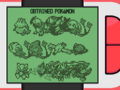 Pokémon History
 -
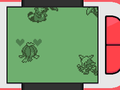 Friendship Checker
 -
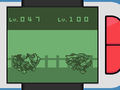 Egg Monitor
 -
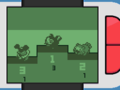 Chain Counter


Related articles
| |||||||||||||||

|
This game mechanic article is part of Project Games, a Bulbapedia project that aims to write comprehensive articles on the Pokémon games. |